
Figures below are taken from the vendor's public page. This is not a recommendation to buy or sell a security. Disclosure
TradingView plan prices
A reader comparing TradingView’s published charting plans
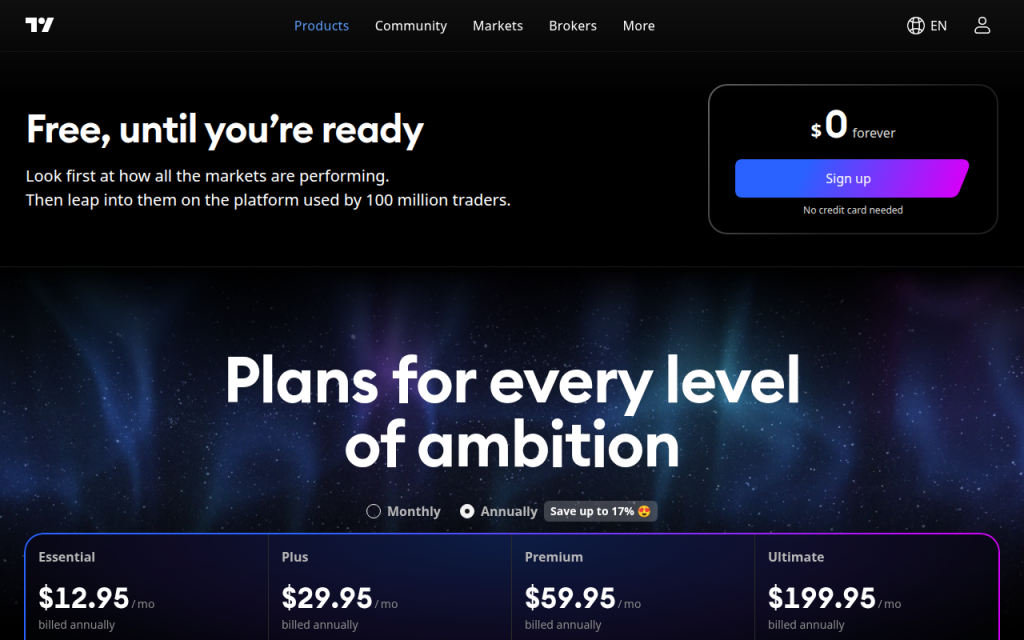
Screenshot of the company's public website, TradingView pricing.
Published terms
- The four paid prices and the free plan are printed on the pricing page captured for this note
- The page says those paid figures are billed annually and shows “Save up to 17%”
- A free plan is offered with no credit card, according to the same page
Limits
- The monthly toggle shows different prices. This note does not copy them because the capture is the annual view
- Feature limits such as indicators and alerts change by plan and were not all in the first screen
- A charting subscription is not a record of a trading result
TradingView sells charting plans for people who watch prices across stocks, funds, futures, currencies, and crypto. This page records the prices on https://www.tradingview.com/pricing/ with annual billing selected. The screenshot shows a free plan at $0, marked “forever,” with a sign-up button and the line “No credit card needed.” Below that, four paid plans are labeled billed annually: Essential $12.95 a month, Plus $29.95 a month, Premium $59.95 a month, and Ultimate $199.95 a month. The page also says “Save up to 17%” next to the annual choice. Those are the figures this review uses, because they are the figures in the image.
What “$12.95 a month, billed annually” means
The $12.95 is the monthly equivalent of an annual charge, not a promise that the card will be billed $12.95 twelve separate times. The page says “billed annually” under the price. The amount that leaves the account at signup is the yearly total. Twelve times $12.95 is $155.40. Twelve times $29.95 is $359.40. Twelve times $59.95 is $719.40. Twelve times $199.95 is $2,399.40. Those multiplications are this page’s arithmetic so a reader can see the annual charge implied by the monthly equivalent. TradingView’s own page is the authority if it displays a yearly total that rounds differently. The monthly toggle, which is visible but not selected in the capture, shows another set of prices. This note does not copy that set. Switching the toggle is the way to see it.
The free plan is a real row on the page, at $0, with no credit card requested in the hero. A free charting account is not a paid Essential plan with the price waived in a footnote that was missed. The paid plans sit under the heading “Plans for every level of ambition.” The marketing sentence above the prices, about looking at markets and then trading on the platform, is TradingView’s description of itself. It is not a result from a trade placed for this review.
What the first screen does not list
Indicator limits, alert counts, and the number of charts on a tab are the usual differences among these plans, and they sit further down the pricing page than this capture goes. This review does not fill them in from an older visit. If a comparison depends on “five indicators” or “twenty alerts,” that comparison has to be read on the live page under the plan name, not assumed from the dollar figure alone. A higher price is not, by itself, a count of indicators.
The capture also does not show a backtest, a filled order, or a broker connection. TradingView can be used beside a broker. The pricing page in the screenshot is a software subscription. It does not display a commission schedule for a particular broker, and this page does not invent one.
How this differs from a research terminal and from a robo-advisor
Koyfin’s pricing page, captured separately, shows monthly research-terminal prices of $0, $39, $79, and $209. That is a different product: fundamentals and portfolio data, with advisor plans, rather than the charting grid in this screenshot. An advisory fee at Fidelity Go, Vanguard Digital Advisor, or Schwab Intelligent Portfolios is a third kind of price. It is a percent of assets, or zero, for managing an account. TradingView’s $12.95 is not a percent of anything. It does not shrink when an account is under $25,000, and it does not become 0.35% when an account grows. Adding it to an advisory fee is only honest if both units stay in the sentence: dollars per month for the charts, and a percent of assets for the managed account.
What was not tested
No TradingView account was created. No chart was saved. No alert was fired. The “Save up to 17%” line was read as a headline on the annual toggle, not recomputed from a monthly-versus-annual pair, because the monthly prices are outside this capture. The 17% is TradingView’s statement about the gap between billing choices. It is not a return.
Mintcanopy is not scoring the plans. Essential at $12.95 billed annually is the cheapest paid row in the image. Ultimate at $199.95 billed annually is the most expensive row in the image. Which row matches a person depends on limits this first screen does not show. The useful next click is the same pricing page, scrolled, with the billing toggle in the position the buyer will actually use. The screenshot remains a picture of the annual view, including the $0 plan and the four paid prices named above. If TradingView changes a card, the live page wins over this paragraph.
A buyer comparing the four annual equivalents side by side can rank them without a score. Essential’s implied annual charge, at twelve times $12.95, is $155.40. Plus is $359.40. Premium is $719.40. Ultimate is $2,399.40. The gaps are the published price gaps under annual billing, not a judgment about which plan draws a better chart. The free plan remains $0 in the hero, with no credit card requested there. Feature limits that would explain the gaps are below this capture and stay out of the ranking until they are read on the same page.
The hero also says the platform is used by a very large number of traders and invites a person to look at markets first. That is an acquisition line. It does not change Essential’s $12.95 annual-billing equivalent or the fact that the paid rows are labeled billed annually. A decision that needs the monthly price has to select the other toggle. This capture will not stand in for it.